
FIELD NOTE
Chaotic TCG & Progressive Web Apps: What a PWA Means for the Game
An in-depth breakdown of Progressive Web App (PWA) technology, why it makes sense for Chaotic, its pros and cons, and step-by-step installation guides.
 AwfullyFrosty/
Chaotic TCG & Progressive Web Apps: What a PWA Means for the Game
There has been a lot of speculation and discussion surrounding the upcoming online game client for Chaotic. But before jumping straight into the technical side, I want to talk about Chaotic as a game. Why online play is crucial for its revival, why opting for a Progressive Web App (PWA) architecture makes the absolute most sense (In my opinion!), what a PWA actually is, its pros and cons, and a complete step by step installation guide for iOS, Android, and PC.
Chaotic is intrinsically based on the idea of the real world and the digital world becoming one. Players owning physical cards while battling in an amazing digital universe. It really was far ahead of its time when it first launched in 2007. Back then, online TCGs barely existed (The Lord of the Rings TCG was really the only major peer that I could find), and tying a unique digital code to a physical card is a concept I've wished other major card games would adopt ever since, but never did sadly!
Because of this hybrid design, the game needs to be accessible to all players. We live in a digital era far beyond where we were during Chaotic’s original release (2007 for online play). Today, people interact with the internet using thousands of different hardware configurations, screen sizes, and operating systems. So how does a game meant to bridge physical and digital play maximize its exposure without limiting its community?
Look at games like Magic: The Gathering Arena (MTGA). I’ll mainly talk about MTGA since it’s the main modern TCG I have deep exposure to. MTGA started exclusively as a Windows PC game, with no mobile or macOS support at launch, limiting its initial player base and growth. It expanded to macOS via the Epic Games Store in June 2020, and eventually reached Android and iOS in March 2021 years after its initial release. What most people don't realize is that developing across these platforms natively often requires building and maintaining distinct codebases. While they might share core backend engines, adapting the interaction model, graphics pipelines, and UI for every individual platform takes massive developer resources, potentially years of work, and money. While some game engines like Unreal can help with this it still something that has to be considered and not every game untilze the same engines.
How is Chaotic Doing This Differently?
Chaotic is leveraging a modern web technology called a Progressive Web App (PWA). While PWAs have been around for a while (gaining major industry adoption around 2015–2016), they completely eliminate the headache of building custom, native applications for every hardware configuration, operating system, and app store ecosystem.
Going with a PWA site drastically streamlines the development process while enabling a massive, widespread user base from day one. This means on launch day, the game will be available to virtually everyone across multiple devices simultaneously! No app store gatekeeping, minimal software limitations, and instant access ANYWHERE you want to play! (As long as you have internet or data of course)
What is a PWA?
Instead of downloading from an installer from the Apple App Store, Google Play Store, or running a heavy .exe installer on your PC, you access a PWA directly through your web browser.
A PWA runs inside your browser, but it behaves and feels just like a regular app installed once locally on your phone or desktop. You can add it to your home screen or desktop, launch it via its own standalone icon, and run it in an isolated window without any browser search bars or UI clutter. It is essentially an App that is sneakily a browser!
Under the hood, a PWA relies on three main technologies to pull this off:
- Service Workers: A script that runs in the background independent of the webpage. It intercepts network requests, manages client caching, and speeds up load times drastically. Service workers also grant offline capabilities, which could allow you to inspect your collection, read card text, or build decks even without an active internet connection.
- WebAssembly (Wasm) & WebGL/WebGPU: Modern web browsers aren't just for rendering text and static images anymore. Technologies like WebAssembly allow developers to run compiled high-performance code (like C++ or Rust) directly in the browser similar to app native speeds. Combined with WebGL or WebGPU, a PWA can render 3D arenas such as the Battleboard or maybe the BattleDromes or even actual Location Cards, animated card effects, Attack Card effects, Mugic Card effects, 3D Battlegear/Creatures and clean UI smooth enough to rival native games. Which could allow for some really awesome digital gameplay!
- Web App Manifest: A simple JSON file that tells the user's operating system how the app should look and behave when launched. Defining home screen icons, orientation locks, splash screens, and window borders.
Key benefits of a PWA include:
- Lightweight Footprint: You don't need to download gigabytes of raw game assets upfront, which keeps the game from clogging up storage space on your device. Assets are fetched and cached dynamically as needed.
- Native Hardware Access: PWAs can request hardware permissions on your device like any other app. Things such as your camera for scanning physical card codes! (The scanner is real! lol)
- Push Notifications: This allows players to stay updated on game news, turn alerts, match invites, or tournament updates (I believe we will get them!) directly on their device lock screens.
Why a PWA Makes the Most Sense for Chaotic
Accessibility is the main driver here. Almost everyone owns a smartphone or computer with browser capabilities, but not everyone owns high-end gaming hardware or high-end phone hardware. Developing traditional native games requires heavy per-device optimization to run smoothly on lower-tier hardware. An issue that can regularly lock budget mobile users out of games like MTGA sadly. With a PWA, as long as a device has a modern web browser and an internet connection, it can jump straight into a match. We always have to keep in mind the CORE concept of Chaotic which is digital integration! This is a game built on blending two worlds in a way no other TCG has matched. The game design is like this, the card desgin is like this and the show emphasizes this! Making it frictionless to log in and play is key!
From a developer perspective, PWAs bypass the friction and headaches of native app stores. App store review boards (especially Apple's App Store, kill me) often delay crucial bug fixes or balance updates for days or weeks. Furthermore, native app stores require tailored build configurations and take revenue cuts for app transactions.
With a PWA, developers maintain a single codebase. Updates deploy instantly server-side, giving every player on earth access to the newest patch and bug fixes simultaneously without waiting on store approvals. As a software developer myself, I think this is a brilliant move tech wise!
Server-Authoritative Architecture
To make competitive play fair, Chaotic utilizes a Server-Authoritative Architecture. This means the core game logic runs on a secure backend server rather than trusting your local device.
For example, when you play an Attack Card or play a Mugic Card, your client simply sends that intent to Chaotic's game servers. The server validates the action, calculates rules, the burst, and energy outcomes, then sends the updated game state back to both players. Keeping rule processing server-side ensures 100% consistent rule enforcement and completely prevents client-side memory tampering or cheating.
Pros and Cons of PWA Technology
| Pros | Cons / Limitations |
|---|---|
| Single Codebase: Instant, synchronized updates across iOS, Android, and Desktop simultaneously. | iOS Bluetooth/NFC Restrictions: Web Bluetooth and Web NFC APIs remain heavily restricted by Apple on iOS browsers. |
| No App Store Delays: Bypass approval queues, guidelines, and revenue cuts on Apple and Google storefronts. | iOS Background Limits: iOS aggressively suspends background API processing when the app window is minimized. |
| Minimal Storage Footprint: Ultra-low initial download size with smart local caching via background Service Workers. | iOS Notification Nuances: Requires users to manually add the PWA to their Home Screen before push notifications function. |
| Hardware Access: Full support for device camera access for seamless physical card code scanning. | iOS Cache Eviction: Webkit/iOS aggressively purges local cache/storage after 7 days of non-use compared to Android. |
How to Install the Game (iOS, Android, and PC)
Installing a PWA doesn't require searching an app store like traditonal apps or going to a specific download page on web which can sometimes cause a lot of confusion for people on HOW to download the game. Here is how to add the application directly to your home screen or desktop across all major platforms:
1. iOS (iPhone / iPad via Safari)
- Open Safari and navigate to the official Chaotic web game URL:
https://www.chaoticgame.com/en/ - Tap the Three Dots or menu option in the bottom toolbar.

- Tap the Share button.
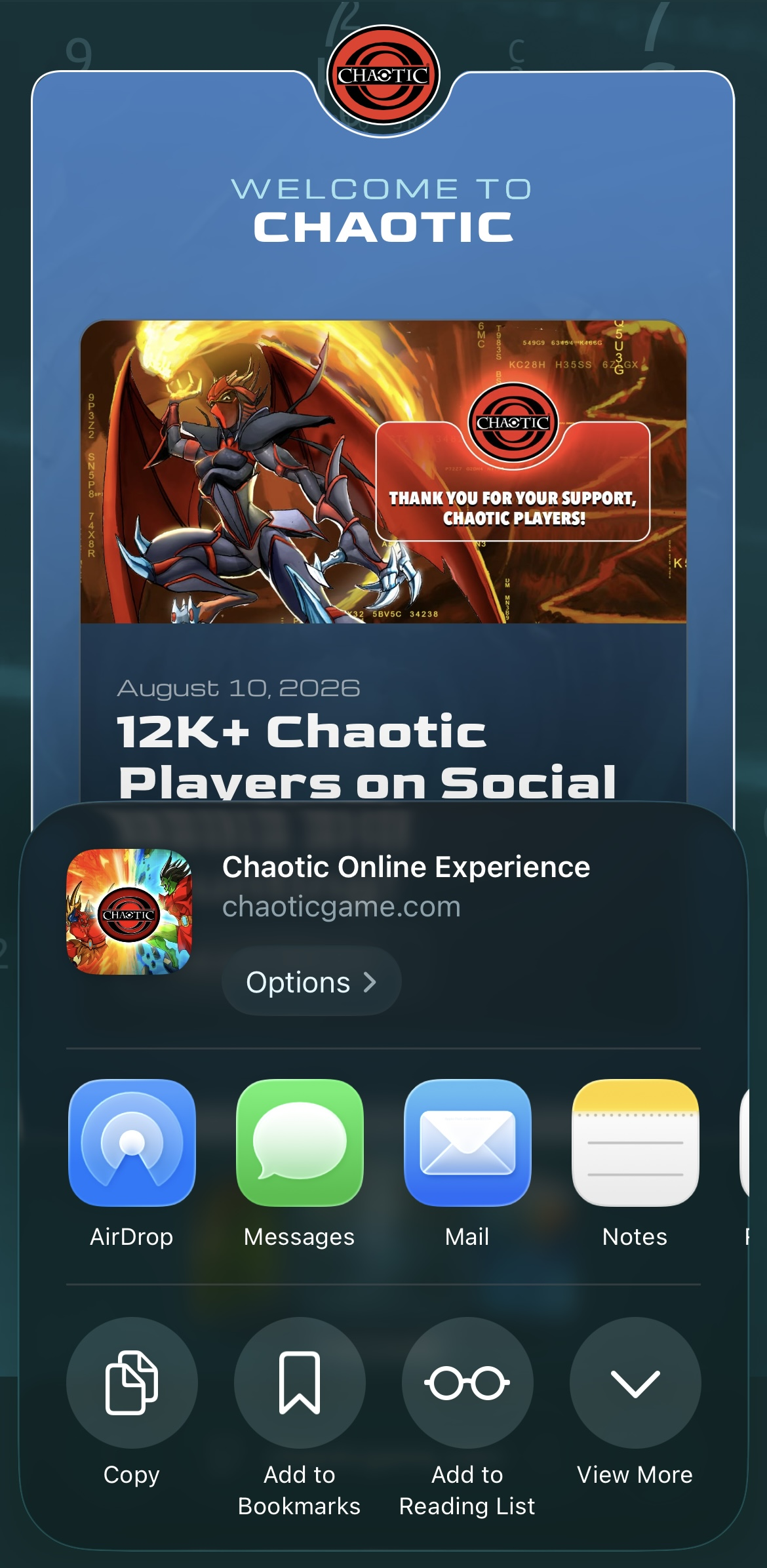
- Tap View More if needed to expand your options.
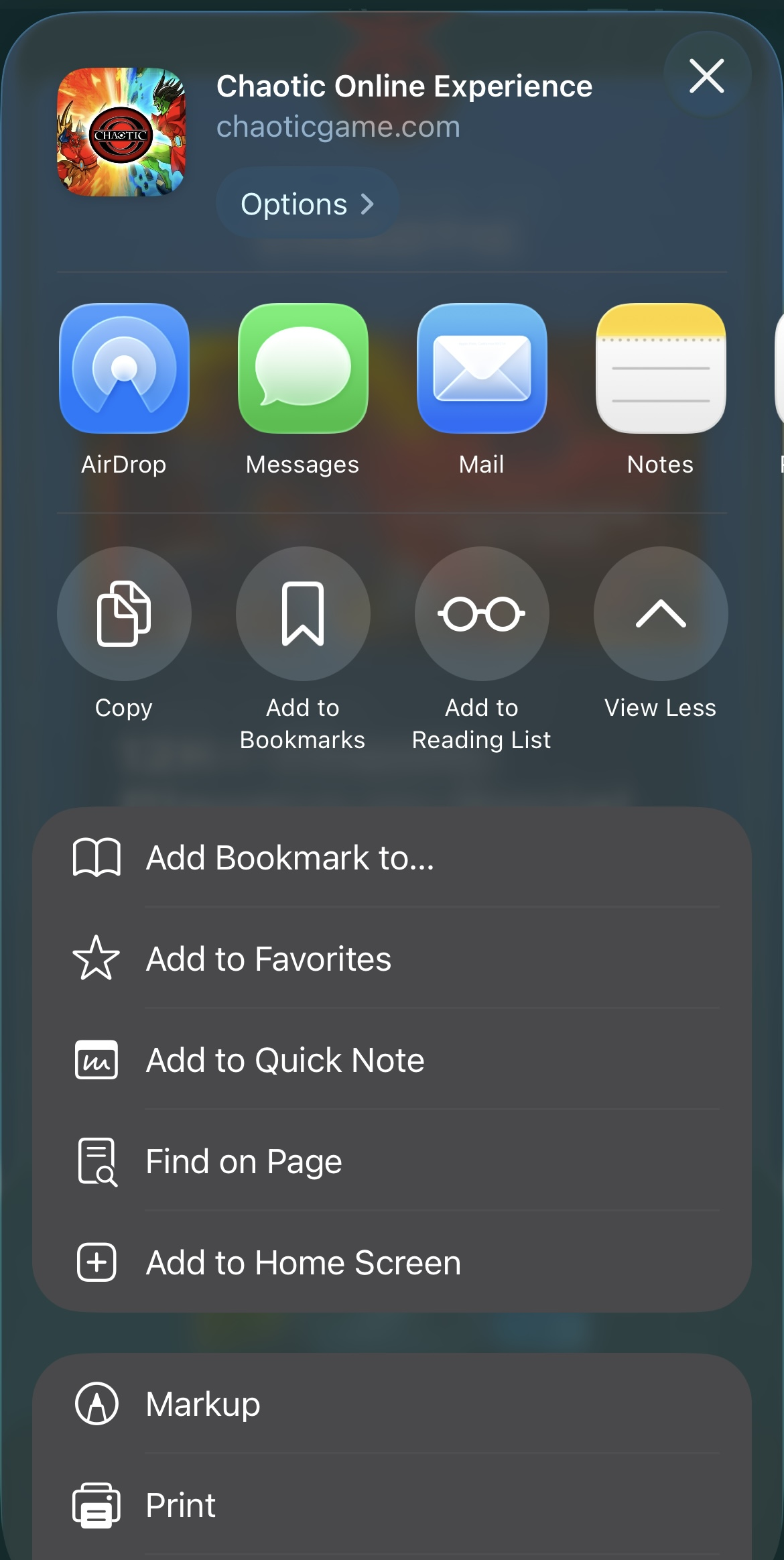
- Scroll down the share menu and select Add to Home Screen.
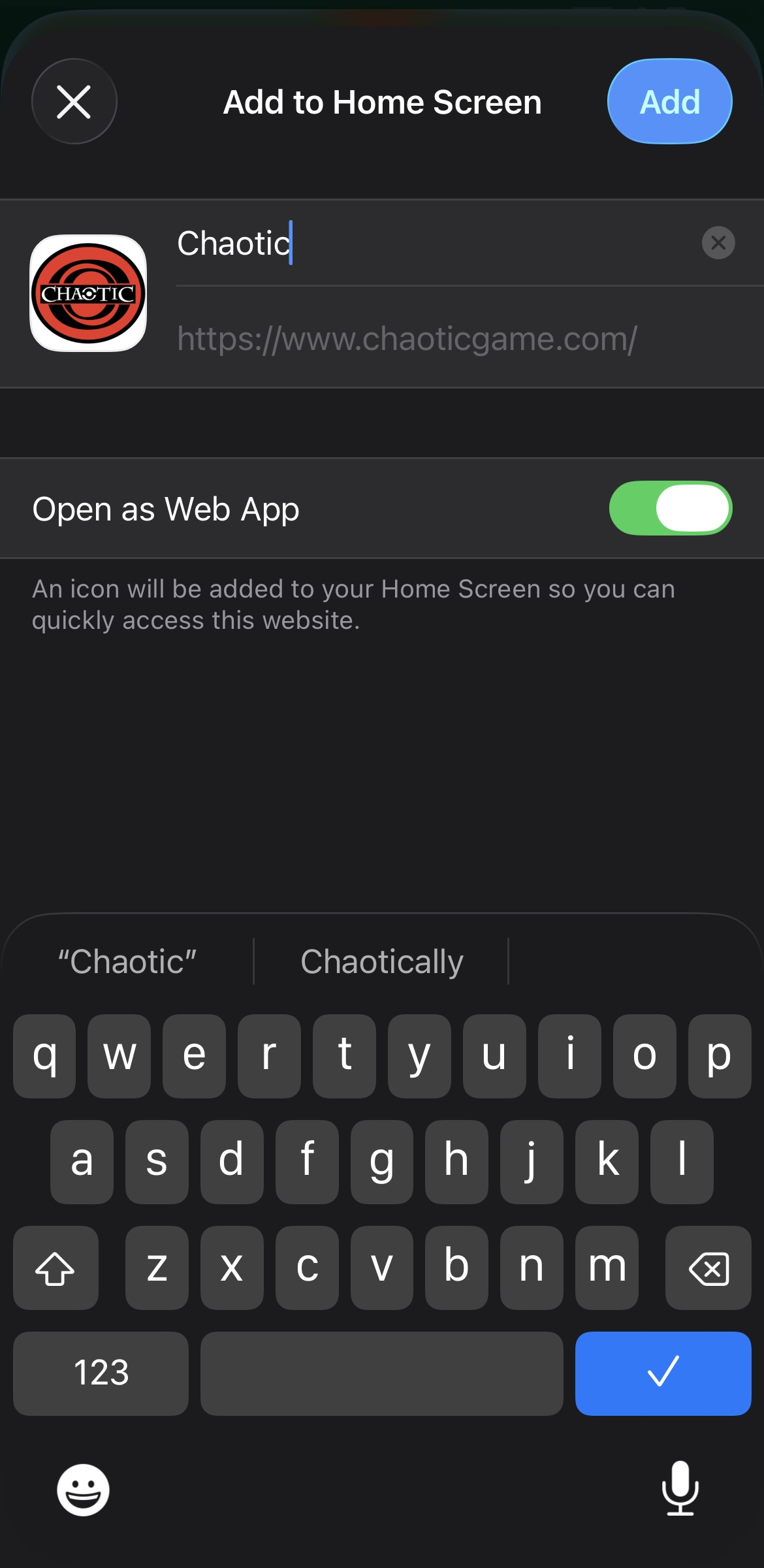
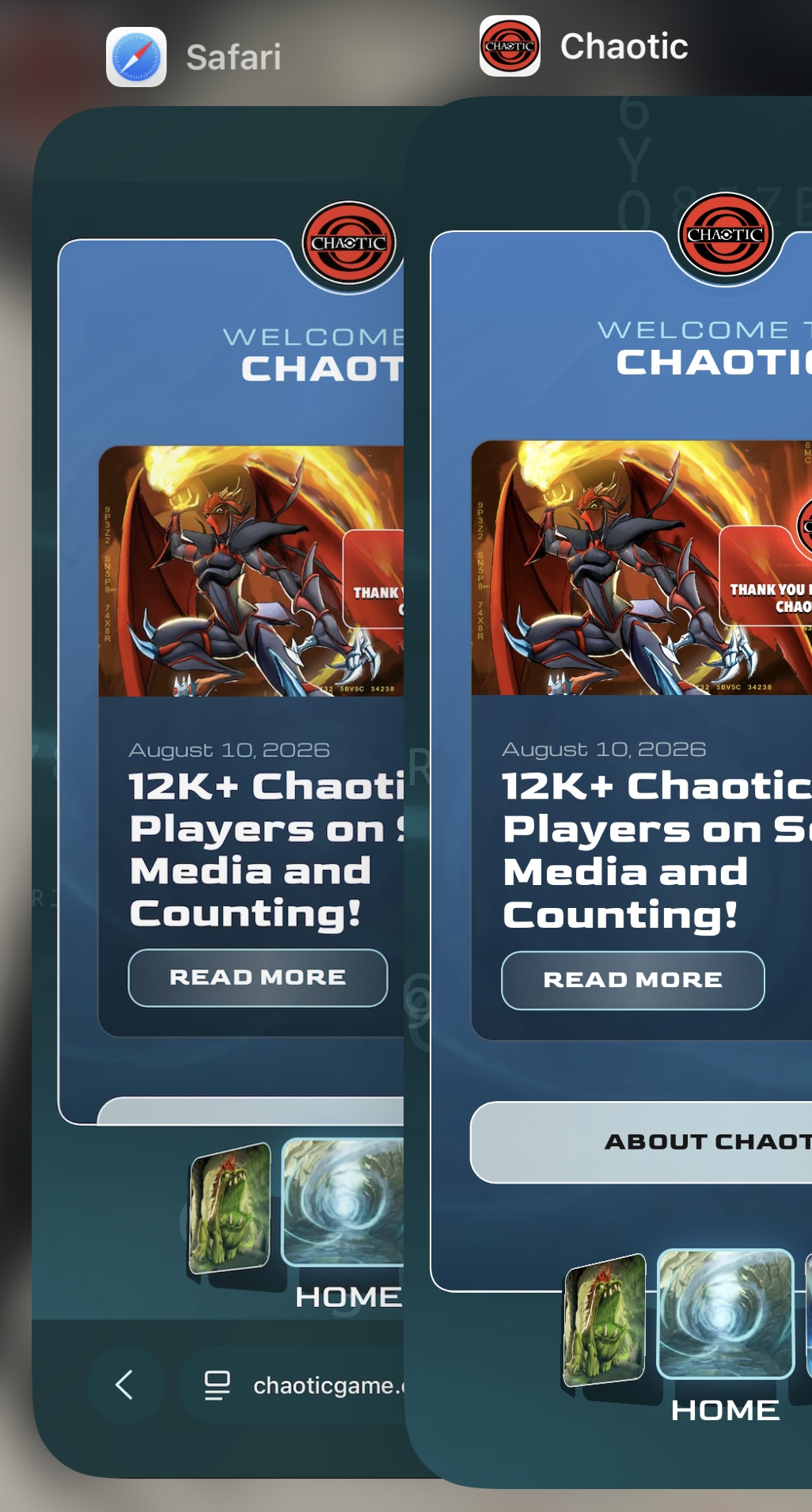
- Confirm the app name and tap Add in the top-right corner. The app icon will now appear cleanly on your home screen like any native app!


2. Android (via Google Chrome or Compatible Web Browser)
I don't have images examples i am sorry! :(
- Open Google Chrome and navigate to the official Chaotic web game URL:
https://www.chaoticgame.com/en/ - Tap the Three Dots menu icon in the top-right corner of the screen.
- Select Install App (or Add to Home Screen depending on your browser version).
- Follow the simple on-screen prompt to confirm installation. The app icon will automatically place itself in your app drawer and main home screen, operating independently from Chrome!
3. PC / Mac (via Google Chrome or Microsoft Edge)
- Open Chrome or Edge and navigate to the official Chaotic web game URL:
https://www.chaoticgame.com/en/ - Look at the right side of your address bar for the Install icon (a small icon showing a desktop computer with a down arrow, or a small
+icon).
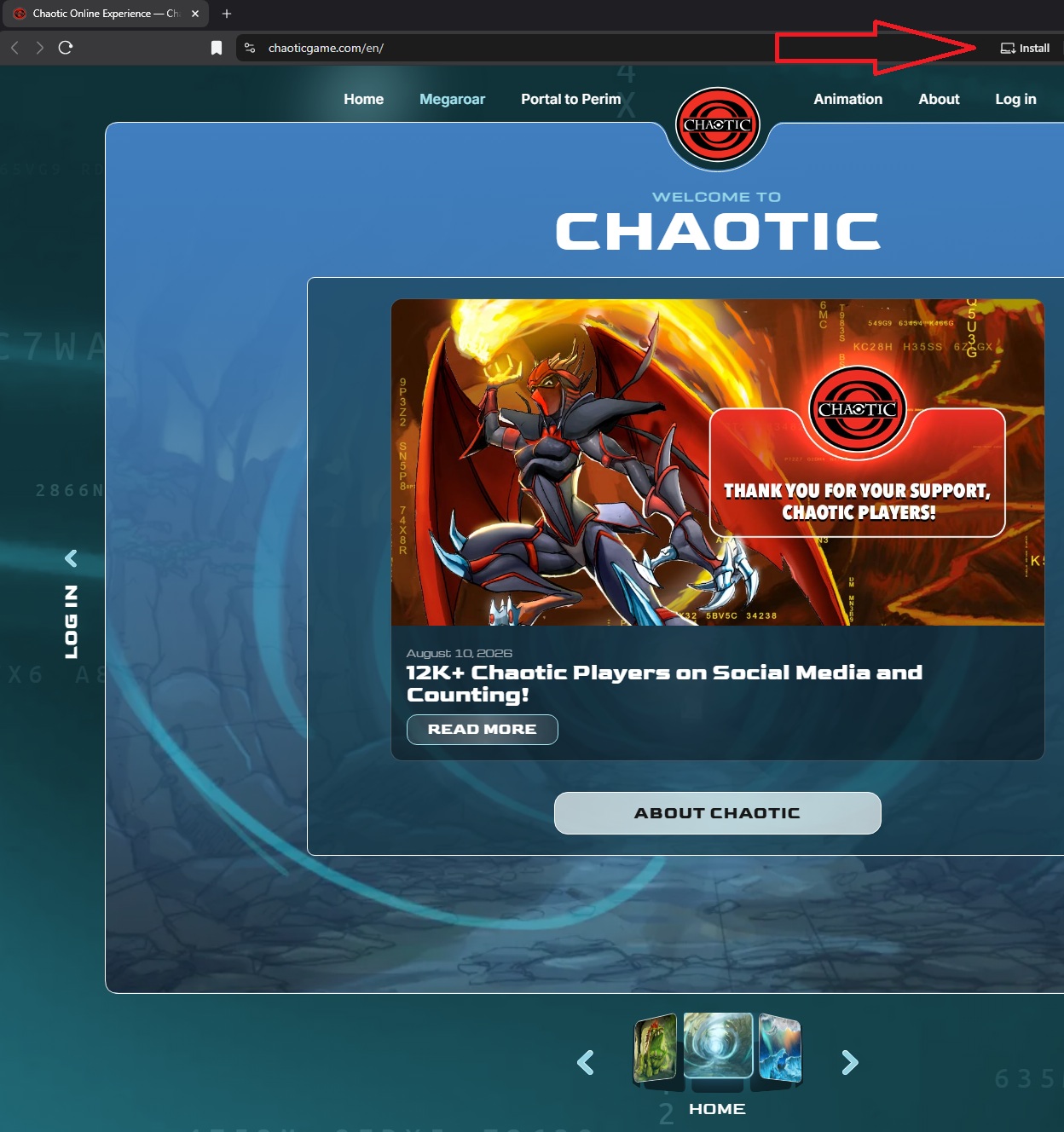
- Click Install when prompted by your browser.
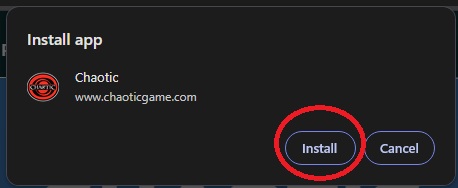
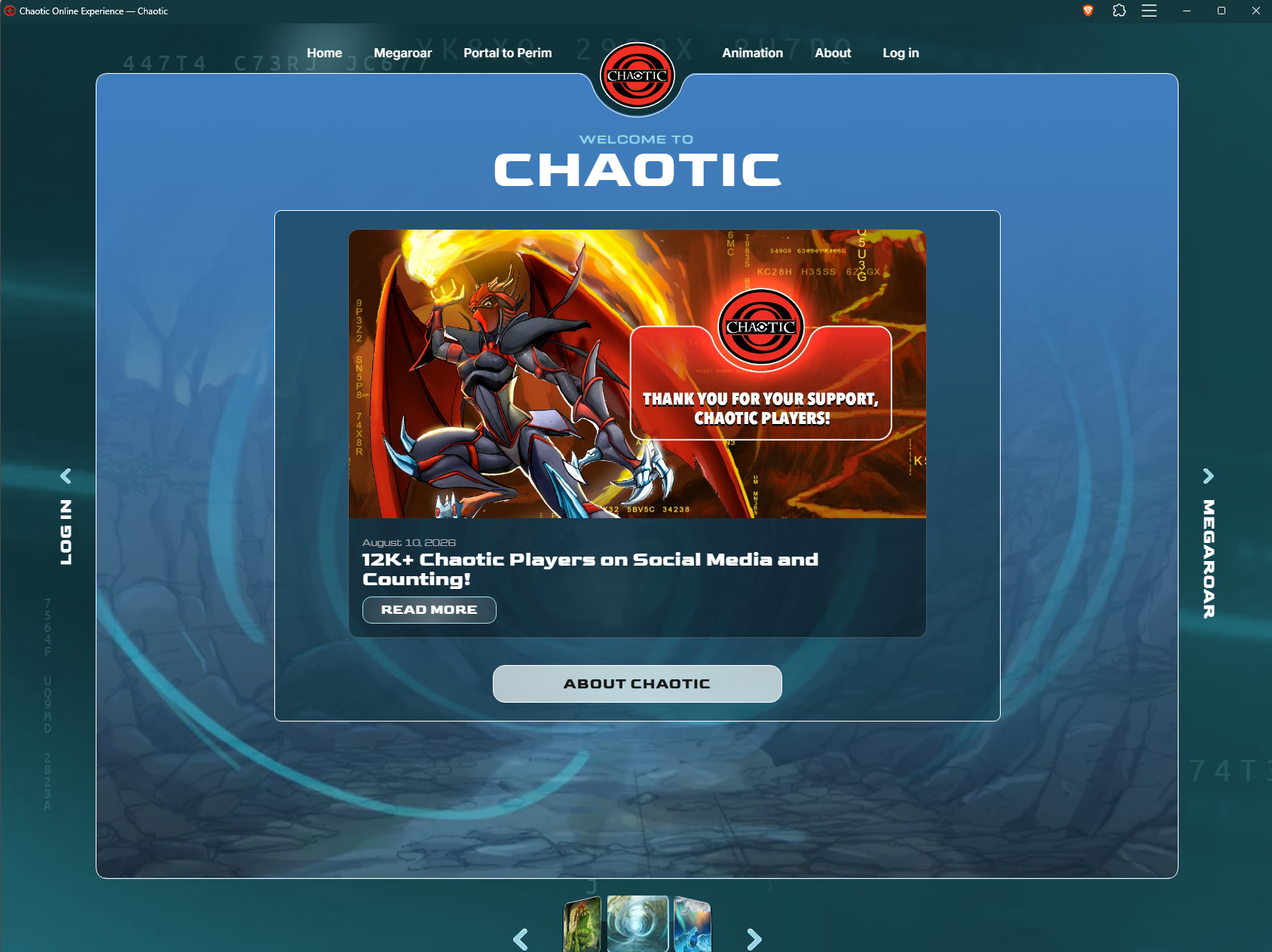
- The game will automatically launch in its own dedicated, standalone application window and generate desktop and taskbar shortcuts for quick launch access!

Closing Thoughts
I hope this clears up the confusion surrounding why the development team for Chaotic selected a Progressive Web App architecture for Chaotic's modern digital return. Online play has always been fundamental to the identity and soul of this game, and choosing a PWA structure prioritizes broad accessibility over platform exclusivity.
While official release dates for full online play remain unknown, adopting web native technology sets a solid foundation for rapid updates, low hardware friction, and seamless cross-platform play.
Thank you for taking the time to read! I appreciate you all! Hopefully we get more updates soon on all of this, card art, and more! (Saw rumors maybe tommrow?? PLEASE GANNON!)
Also, if anyone knows how to contact the Development Team I would love to know as i would like to make sure the site works with theirs day one and natively! (Tall order i know)
Stay Frosty! - AwfullyFrosty